Script Font vs. Cursive vs. Italic: What’s the Difference
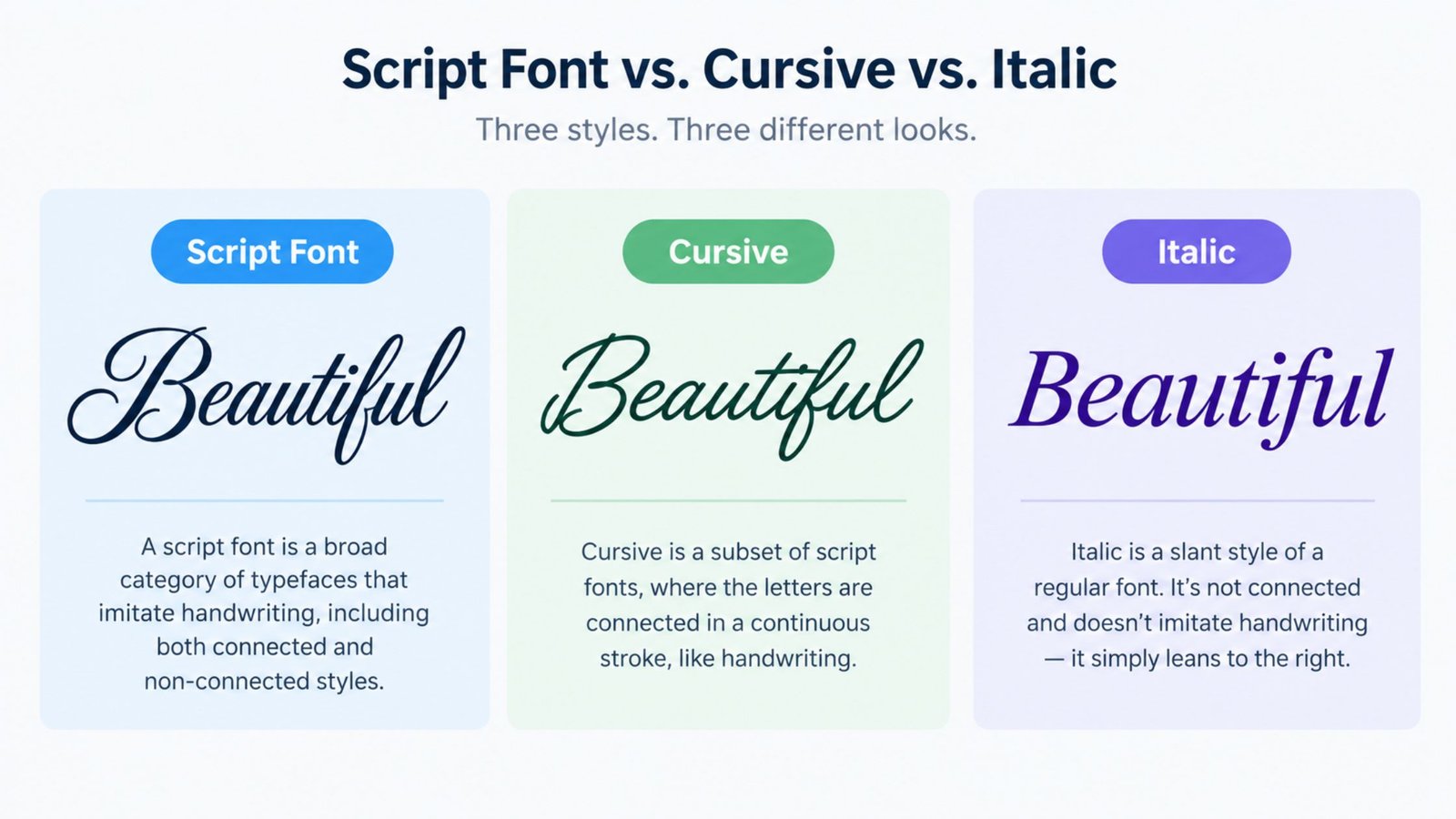
Script, cursive and italic get used almost interchangeably in everyday conversation, all as shorthand for “fancy, slanted lettering.” They’re not the same thing, and the differences aren’t just technical trivia. Knowing which one you’re actually looking at, or actually need, changes what you should search for, what kind of font or tool solves your problem, and what you should expect it to do. This guide breaks down what a script font actually is, how cursive fits inside that category rather than beside it, how italic is a different axis entirely, and where each one shows up in the real world.
What Is a Script Font?
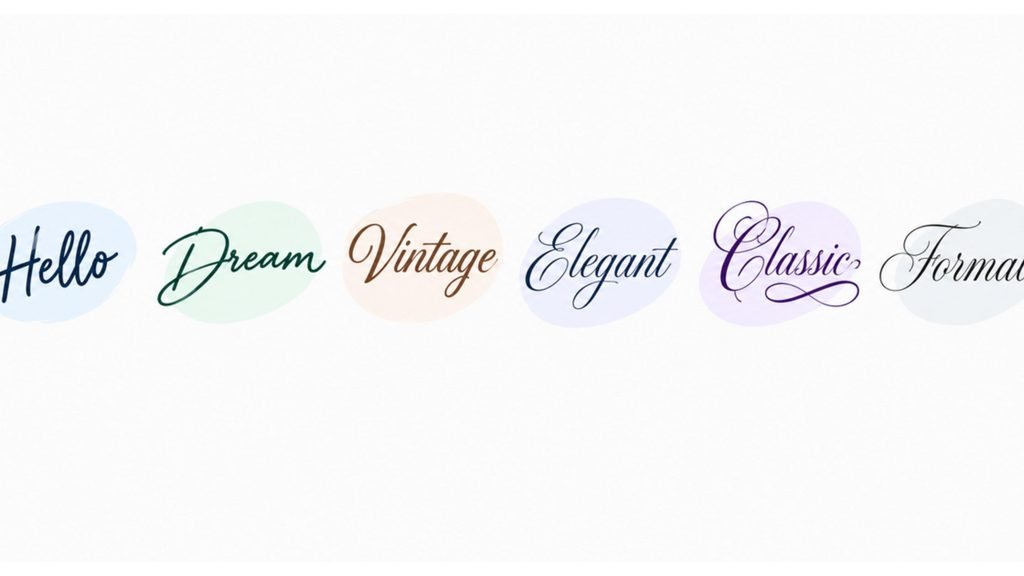
A script font is a typeface designed to resemble handwriting or hand-lettering, ranging from loose and casual to formal and ornate. It’s a broad category, not a single style. Some script fonts imitate fast, connected cursive handwriting. Others imitate a formal calligrapher’s pen, with each letter carefully separated and heavily decorated. What unites them is the intent: a script font is built to look handwritten or hand-lettered rather than mechanically typeset, even though, like every other font, it’s still a fixed, repeatable digital design.
Script fonts are everywhere once you start noticing them. Wedding invitations, perfume and cosmetics packaging, coffee shop logos, movie title cards and greeting cards all lean heavily on script typefaces, specifically because they read as more personal and less corporate than a standard sans-serif or serif font. Well-known examples span a wide range within the category: Dancing Script and Brush Script sit on the casual, clearly-connected end, while something like Edwardian Script or Bickham Script sits on the formal, heavily ornamented end, closer to engraved calligraphy than to handwriting someone would actually use day to day.
That range is exactly why “script font” alone doesn’t tell you much about how connected or casual a specific font actually looks. It tells you the font is trying to look handwritten. Cursive and italic are two separate, more specific ideas that often get folded into that same general impression.
A Short History of Script Fonts
Script typefaces didn’t start as digital fonts at all. They started as engraving and penmanship styles, centuries before anyone needed a font file. Copperplate engraving, used for formal documents, certificates and announcements, produced the thin-to-thick stroke contrast that still defines the most formal script fonts today, achieved by hand with a pointed metal tool rather than a pen. Spencerian script and later the Palmer Method brought a related but more practical style into everyday handwriting instruction, prioritizing speed and legibility over engraved formality, which is the same handwriting tradition this site’s own cursive guides are built on.
When type foundries began converting handwriting and engraving styles into reusable printed fonts, script typefaces were some of the hardest to get right, since the whole appeal of handwriting is that it isn’t mechanically repeated. Early script fonts often looked stiff compared to real handwriting, because each letter had to be redrawn as a fixed shape that still needed to connect convincingly to its neighbors. Digital type design eventually solved this more thoroughly, using contextual alternates and multiple versions of the same letter so a script font could vary slightly depending on what came before or after it, getting closer to the natural inconsistency of real handwriting than early fonts ever could.
That history explains why script fonts still split so clearly into the casual, clearly-connected cursive-style end and the formal, engraved-calligraphy end. They’re not two points on one invented spectrum. They’re two different real-world traditions, hand penmanship and formal engraving, that both got digitized and both still get called “script.”
Script vs. Cursive: Are They the Same Thing?
No, and the relationship between them is not two separate categories, it’s a category and a subset. Cursive is a specific kind of script, defined by one concrete feature: the letters within a word connect to each other in a single, continuous stroke, the way actual handwritten cursive does. That’s a narrower, more technical definition than “script” as a whole.
Plenty of script fonts are also cursive, in this stricter sense. Dancing Script and Brush Script both connect their letters, mimicking real handwritten cursive closely enough that they’re reasonable stand-ins for it in a design mockup. But plenty of script fonts are not cursive at all, even though they’re clearly scripts. A heavily decorated calligraphic font like Edwardian Script keeps each letter as its own separate, ornamented shape, with flourishes connecting them visually rather than one unbroken stroke running through the whole word the way genuine cursive handwriting does.
This is also where the site’s own focus sits. The guide to how to write in cursive is about that narrower, connected-stroke category specifically, not about script fonts as a whole. If you’re trying to learn the handwriting skill itself, rather than pick a typeface that merely resembles it, that’s a different, more specific goal than browsing script fonts in general.
Script vs. Italic: Are They the Same Thing?
No, and this pairing causes more confusion than script versus cursive does, because italic shows up constantly in ordinary body text, not just in decorative design work. Italic is a slant, a variant built from an existing font to lean its letters and add emphasis within a sentence, the way this word is italicized right now. It’s a typographic tool for emphasis, titles and foreign-language terms, not a category of handwriting-style design.
Most fonts that aren’t scripts still ship with an italic variant. A standard sans-serif or serif font’s italic version leans the same basic letterforms, sometimes with slightly different joins, but it doesn’t suddenly start looking handwritten or script-like. Times New Roman Italic is still clearly Times New Roman, just slanted. That’s the core distinction: italic describes what’s been done to a font (slanted, for emphasis), while script describes what a font is trying to look like (handwriting).
The confusion happens because most script fonts are also slanted, simply because real cursive handwriting naturally leans. Seeing a slanted, flowing typeface makes “italic” feel like the right word, even when “script” is the more accurate one. A script font usually doesn’t have a separate italic variant the way a standard font does, since the font itself already represents a single handwritten style rather than an upright style with a slanted alternate. A font can be italic without being script at all, and a script font can exist without technically being described as “italic” in the typographic sense, even though it’s visually slanted.
How Cursive, Script and Italic Relate to Each Other
Putting the two comparisons together, script is the broad umbrella, covering any typeface built to look handwritten or hand-lettered. Cursive is a subset of script, specifically the connected, continuous-stroke kind, the actual handwriting style this site’s own guides teach people to write by hand. Italic is a different concept entirely, a slant variant that applies to fonts generally and isn’t tied to looking handwritten at all, even though cursive and most scripts happen to be slanted as a side effect of how the letters flow.
Thinking of it as two separate questions keeps it straight. The first question is what the font is trying to represent: ordinary type, or handwriting. That question splits fonts into standard typefaces and script typefaces. The second question is whether the letters are slanted. That question applies to both categories independently. A script font can be upright or slanted. A standard font can be upright (roman) or slanted (italic). Cursive sits inside the first category, as the specific connected-stroke style within scripts, regardless of how it answers the second question.
Where Each One Is Actually Used
Script fonts as a whole show up wherever a brand or a design wants to feel personal, elegant or handcrafted rather than corporate. Logos, wedding stationery, packaging, restaurant menus and title cards for film and video all reach for script typefaces specifically because they read as less mechanical than a standard font.
Cursive specifically shows up in contexts tied to actual handwriting, past or present. Handwriting instruction, personal signatures, handwritten notes and cards, and journaling are all places where the connected-stroke style matters because a real hand, not a designer’s font file, is doing the writing.
Italic shows up constantly in ordinary text, almost invisibly. Book and movie titles, foreign-language words and phrases, emphasized words within a sentence, and citations all lean on italics as a formatting convention, regardless of whether the surrounding font has anything to do with script or handwriting at all.
How to Tell Them Apart at a Glance
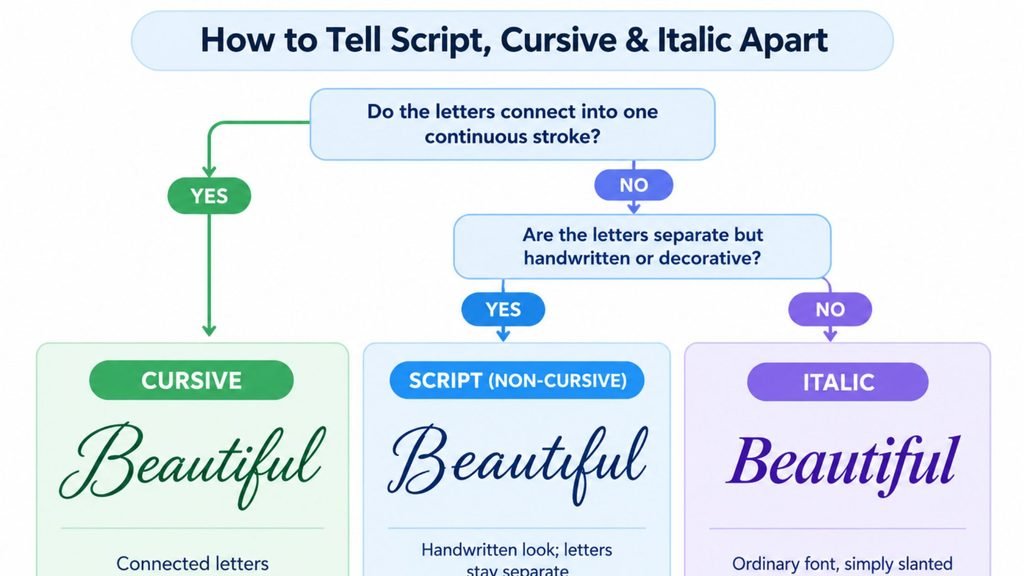
A few quick checks settle which one you’re actually looking at.
- Do the letters inside a word connect into one continuous line, without separate breaks between them? If yes, you’re looking at cursive, or a script font built to imitate cursive specifically.
- Does each letter stay visually separate, even if it’s decorated or has flourishes connecting nearby letters? If yes, it’s a script font, but not the cursive, connected-stroke kind.
- Is it the same basic letterform as an upright version of the same font, just leaned over? If yes, that’s italic, regardless of whether the font looks like handwriting at all.
- Would it look equally natural handwritten with a pen as it does typed on a screen? Script and cursive fonts are built to evoke that handwritten feeling. A plain italic font typically would not, since it’s just a slanted version of an ordinary typeface.
Common Mistakes When Choosing Between Them
A few mix-ups come up often enough to be worth calling out directly.
Picking a heavily ornamented script for something that needs to be read quickly, like a sign, a form or a long paragraph, trades readability for personality in a spot where readability usually matters more. The more a script leans toward formal, engraved-style decoration, the harder it gets to read at a glance.
Assuming any slanted font is “cursive” leads to picking an italic variant of an ordinary font when what was actually wanted was a genuine script or handwriting-style typeface. The slant alone doesn’t carry the handwritten feeling that makes cursive and script fonts distinctive.
Assuming a script font and real handwritten cursive are interchangeable for learning purposes. A script font is a fixed design meant to be typed or inserted into a document. It doesn’t teach the actual hand motion of writing cursive, the same way reading about a stroke doesn’t build the muscle memory of practicing it.
Treating “script” and “calligraphy” as the same word. A script is a font, applied the same way every time it’s typed. Calligraphy is hand-drawn, with natural variation from one letter to the next even when the same calligrapher writes the same word twice.
See Your Own Text in a Cursive Script Style
Reading about the differences is useful, but seeing your own text rendered in an actual cursive-style script makes the distinction concrete.
Cursive Generator converts anything you type into genuine cursive-style text you can copy and paste anywhere, and previews it across several real script fonts at once, so you can see exactly how your own words look in a connected, handwritten-style script rather than imagining it from a description.
Cursive Script Fonts vs. Digital Cursive Text
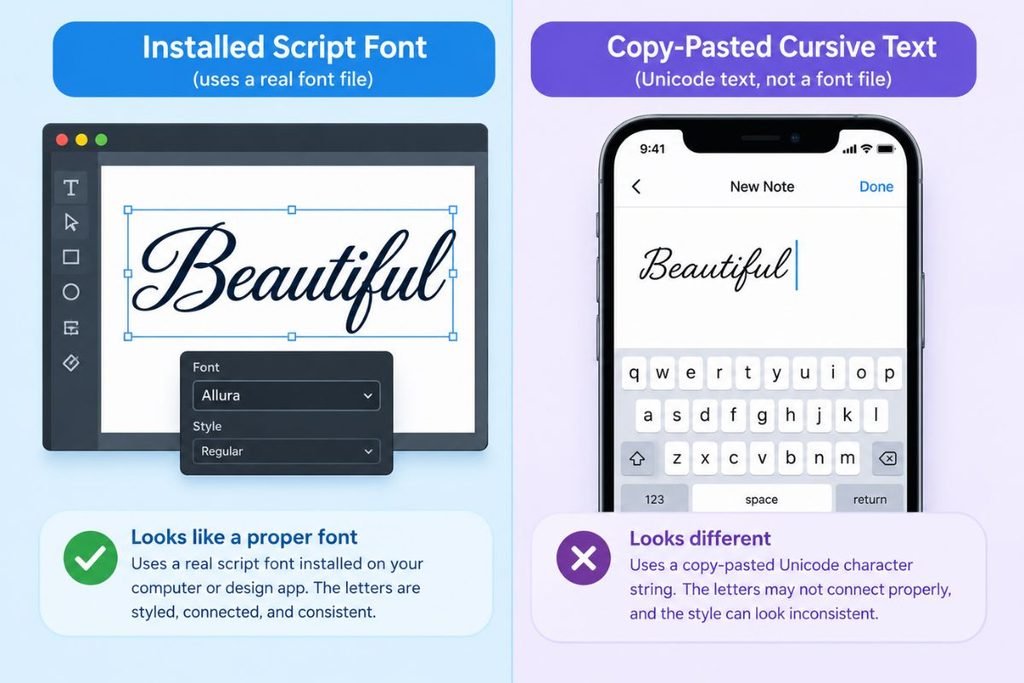
It’s worth separating two different things you might actually be looking for. A cursive-style script font is a typeface, meant to be installed and used in design software or a document, where you control the layout and the font renders consistently for anyone who opens the file.
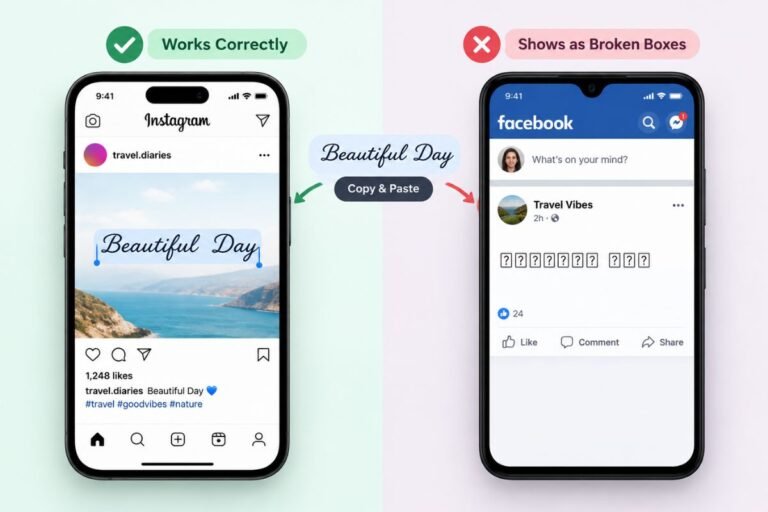
Digital cursive text, the kind you copy and paste into a bio or a caption, works completely differently: it’s built from special Unicode characters rather than an installed font, which is why it can be pasted anywhere plain text is accepted but depends on the receiving app or device to display correctly. The guide to cursive font copy and paste covers exactly how that second approach works and where it tends to break.
Tips for Choosing Between Script, Cursive and Italic
A few practical habits help when you’re actually deciding what to use rather than just reading about the difference.
- Reach for a script font, generally, when the goal is a personal, handcrafted or elegant feeling, like a logo, an invitation or packaging, and legibility at a glance matters less than tone.
- Reach specifically for a cursive-style script, or real handwritten cursive, when the context is tied to an actual hand doing the writing, like a signature, a handwritten card or a note meant to feel personal rather than designed.
- Reach for italics when you need emphasis or a formatting convention within otherwise ordinary text, like a title or a foreign word, not when you want the text itself to look handwritten.
- Check legibility before committing to a heavily ornamented script for anything that needs to be read quickly, like a sign or a form, since the more decorative scripts trade readability for personality.
- Test how a script or cursive font or text actually renders wherever it’s going to be used, whether that’s a printed invitation, a logo file or pasted text on a social platform, since appearance can shift noticeably between contexts.
Frequently Asked Questions
Is cursive a type of script font?
Yes. Cursive is a specific subset of script fonts, the kind where letters within a word connect in one continuous stroke. Not every script font is cursive, since some scripts keep letters visually separate while still looking handwritten or hand-lettered overall.
Is italic the same as cursive?
No. Italic is a slanted variant of an existing font, built for emphasis within ordinary text, while cursive is a connected, handwriting-style script. A font can be italic without looking anything like handwriting, and cursive fonts usually don’t have a separate italic version in the first place.
Is italic a type of script font?
Not usually. Italic is a slant applied to a wide range of fonts, most of which have nothing to do with handwriting. A script font can happen to be slanted, but being slanted alone doesn’t make a font a script, and being italic doesn’t make an ordinary font a script either.
What’s an example of a script font?
Dancing Script and Brush Script are common examples on the casual, connected end of the category, closely resembling cursive handwriting. Edwardian Script and Bickham Script sit on the more formal, ornamented end, closer to engraved calligraphy.
What’s the difference between script and calligraphy?
Script generally refers to a font or typeface, a fixed digital design used the same way every time. Calligraphy usually refers to hand-drawn lettering, often made with specialized pens or brushes and controlled pressure, where the same letter can look slightly different each time it’s written.
Can a font be both cursive and italic?
Technically yes, if a cursive font were built with an additional slant applied on top of its existing letterforms, but in practice this is uncommon. Cursive fonts are already slanted by nature, since real cursive handwriting leans, so a separate italic variant is rarely necessary or offered.
How do I see my own text in a script or cursive style?
Type it into a cursive text generator, which converts ordinary typed text into cursive-style characters or previews it across several real script fonts, letting you compare how it looks before using it anywhere.
Why do some script fonts look stiff or robotic compared to real handwriting?
Early script fonts redrew each letter as one fixed shape, which looked repetitive compared to real handwriting’s natural variation. Modern script fonts reduce this by including multiple versions of the same letter and swapping between them automatically depending on context, getting closer to how a human hand actually varies letter to letter.
Do I need special software to use a script font?
You need the font installed or embedded wherever you’re using it, like a design program, a word processor or a website’s own styling, since a script font is a regular font file like any other. That’s different from cursive copy-paste text, which works as plain Unicode characters in any text field with no font installation required at all.
Conclusion
Script is the broad category: any typeface built to look handwritten or hand-lettered, from casual to highly formal. Cursive sits inside that category specifically, defined by letters that connect into one continuous stroke the way real handwritten cursive does. Italic is a separate idea altogether, a slant applied to a font for emphasis, unrelated to whether that font looks handwritten at all.
Knowing which one you’re actually dealing with points you toward the right tool: an installed script font for a design project, a guide to real cursive handwriting if you’re learning the skill itself, or a text generator if you want to see your own words in a cursive style right now. To see the difference for yourself, type a word into Cursive Generator and preview it across several real script fonts.
One Comment